

Best Ergonomic Keyboards for Wrist Comfort
Eight split, curved and low-strain keyboards tested for the one thing that matters most after a long day at the desk: how your wrists feel when you finally stop typing.
There is a specific moment most people recognize: it is late afternoon, the work is not finished, and your wrist has quietly turned into a dull, hot ache that you keep shaking out between sentences. It is rarely one dramatic injury. It is the slow accumulation of thousands of tiny wrist angles repeated all day, every day, on an input device that was designed around manufacturing convenience rather than human anatomy.
The good news is that this is one of the most fixable problems in a modern workspace. The keyboard you type on determines the rotation of your forearm, the extension of your wrist, and the resting height of your fingers for hours at a stretch. Change that geometry and you change the load on the tendons running through your carpal tunnel. A well-designed ergonomic keyboard does not “cure” anything, but it removes the mechanical cause of a great deal of everyday discomfort.
That is what this guide is about. We collected eight of the most talked-about ergonomic keyboards on the market — from premium wireless flagships with sculpted palm rests to budget wired splits and value-packed keyboard-and-mouse combos — and looked at each one through a single lens: how it actually treats your wrists during real work. Not marketing claims, not feature checklists, but the shape of the board under your hands and the posture it forces you into.
You will find full reviews for every keyboard below, a side-by-side comparison table, a plain-English buying guide, and answers to the questions people ask before they commit to their first split keyboard. Whether you are a writer, a developer, an accountant living in spreadsheets, or someone whose hands simply hurt, there is a shape here that will make tomorrow easier than today.
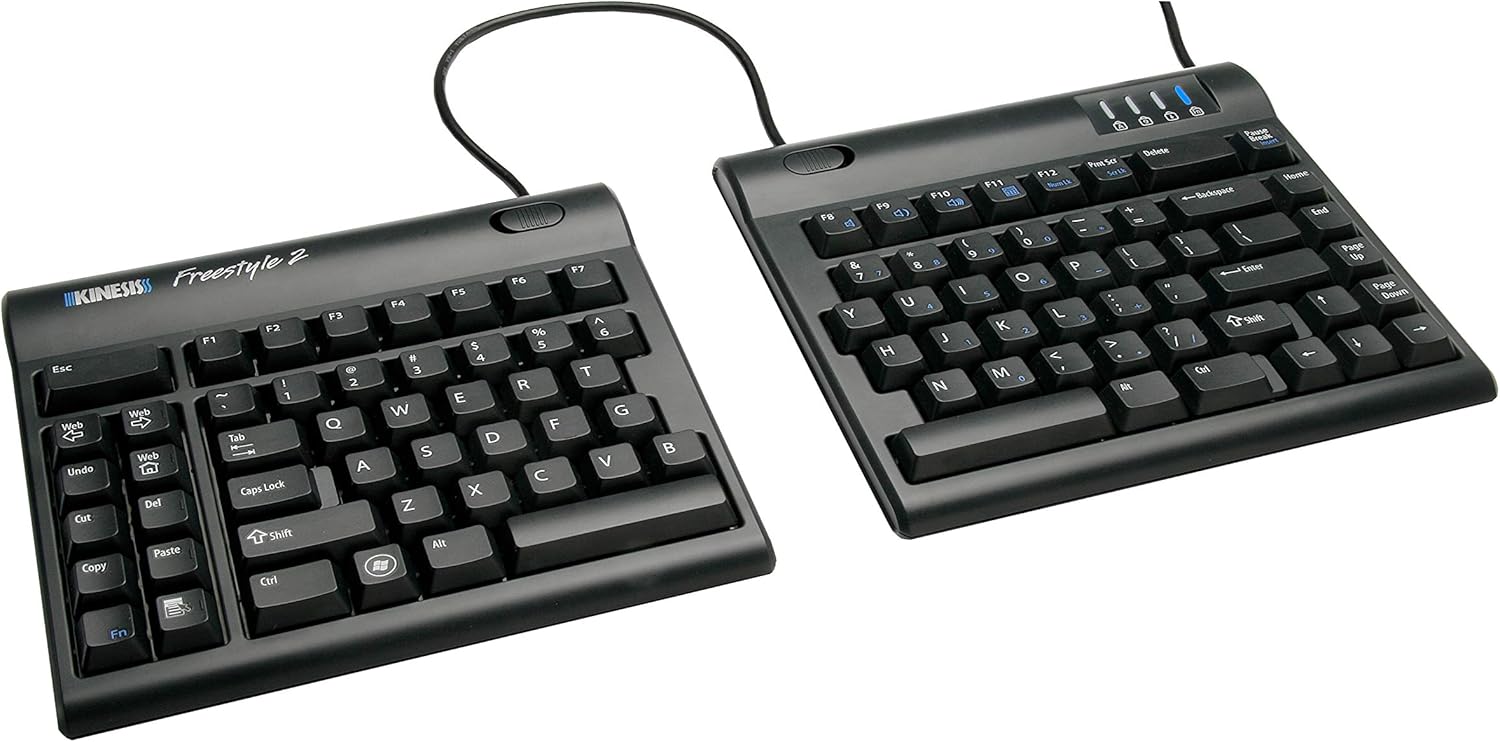
Short on time? The Logitech Ergo K860 is the safest recommendation for most people — a curved split layout with a plush integrated wrist rest that asks almost nothing of your hands. If you want maximum adjustability, the Kinesis Freestyle2 lets you separate and angle the two halves to suit your exact shoulder width.
Ready to Compare Prices?
See current pricing and availability across the ergonomic keyboard range.
Check Price on AmazonQuick Comparison: Our Top Picks
Every keyboard in this guide appears in the table below with the details that matter for wrist comfort. Scroll sideways on smaller screens to see the full breakdown, then read on for the complete review of each model.
Swipe to see more →
| # | Image | Product | Key Details | Verdict | Where to Buy |
|---|---|---|---|---|---|
| 1 |  |
Logitech Ergo K860 Wireless Split Keyboard Best Overall Top Pick | Curved split layout · Integrated cushioned palm rest · Wireless · Multi-device pairing | The easiest transition to ergonomic typing, with a wrist rest that feels genuinely supportive. | Check Price on Amazon |
| 2 | |
Kinesis Freestyle2 Split Keyboard Best Adjustability | Fully separating halves · Adjustable splay · Wired · Optional tenting accessory | The one to buy if your pain is tied to shoulder width or pronation of the forearms. | Check Price on Amazon |
| 3 | 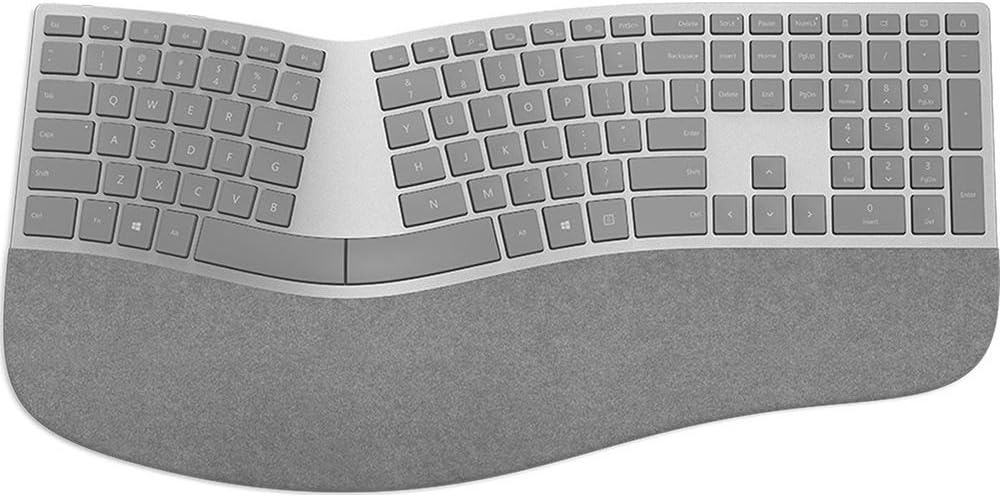 |
Microsoft Surface Ergonomic Keyboard Best Premium Build | Gentle curved split · Cushioned palm rest · Wireless · Premium materials | Quiet, refined and beautifully finished — a pleasure to type on all day. | Check Price on Amazon |
| 4 | 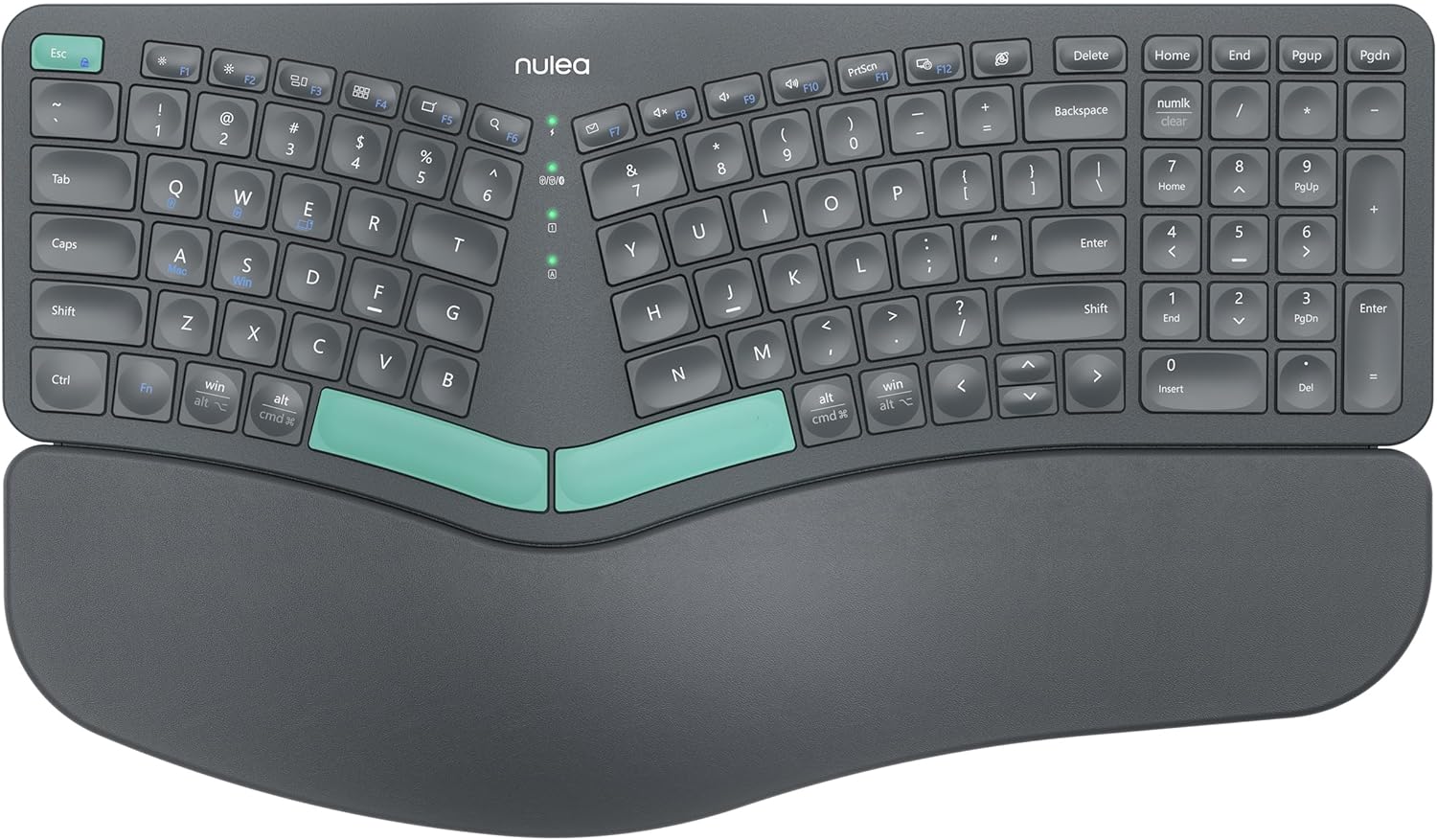 |
Nulea Wireless Split Ergonomic Keyboard Best Value Wireless | Split ergonomic layout · Integrated palm support · Wireless · Value-focused | Brings split ergonomics to a much friendlier budget without feeling flimsy. | Check Price on Amazon |
| 5 |  |
Kensington Pro Fit Ergonomic Wireless Keyboard Best for the Office | Fixed split layout · Wireless · Full-size keys · Dedicated shortcut keys | A sensible, no-drama office board that is easy to share between desks. | Check Price on Amazon |
| 6 |  |
ULSOU Wireless Ergonomic Keyboard and Mouse Combo Best Complete Set | Keyboard + mouse · Split ergonomic layout · Wireless · All-in-one value | Fixes both hands at once — the mouse matters more than most people expect. | Check Price on Amazon |
| 7 |  |
Perixx PERIBOARD-512B Wired Split Keyboard Best Wired Value | Wired split · Fixed tented shape · Full-size with number pad · No batteries | Plug it in and forget about it — simple, dependable and easy on the budget. | Check Price on Amazon |
| 8 |  |
Arteck Split Ergonomic Wireless Keyboard Best Budget Starter | Compact split · Wireless · Lightweight · Budget-friendly | The lowest-risk way to find out whether split typing suits you at all. | Check Price on Amazon |
Details reflect each manufacturer’s general design and feature set. Availability and configurations can vary by region and seller.
Why Wrist Comfort Starts at the Keyboard
Ask ten people why their wrists hurt and nine will say “I type too much.” But volume is only half the equation. The other half is geometry — the exact shape your hand is locked into while that typing happens.
On a conventional straight keyboard, two things go wrong at the same time. First, the two halves of the key field sit directly in front of each other, which forces your arms to angle inward and your wrists to bend outward toward the pinky side — a movement called ulnar deviation. Second, most flat keyboards are typed on with the palms facing straight down, which twists the two forearm bones over one another and holds them there for hours. That is forearm pronation, and it is one of the most under-appreciated sources of desk-related discomfort.
Add a third problem: extension. On a thin keyboard sitting on a hard desk, most people rest the heel of the hand on the surface while the fingers reach up to the keys. That is a gentle but constant backward bend of the wrist, and the tendons that pass through the carpal tunnel do not appreciate being held at an angle all afternoon.
What an ergonomic keyboard actually changes
A good ergonomic keyboard attacks those three problems directly. A split layout lets each hand work in front of its own shoulder instead of pulling inward. A curved or tented shape lifts the thumb side of each hand so the forearm does not have to rotate fully flat. And an integrated palm rest keeps the wrist in a neutral line with the forearm rather than drooping back onto a hard edge.
None of these features are gimmicks. They are direct responses to measurable joint angles, and they are the reason physical therapists and occupational health specialists have recommended split keyboards for decades. The difference is that modern designs have become genuinely pleasant to live with — quiet key action, wireless connectivity, thoughtful palm materials, and layouts that do not require you to relearn how to type.
The key insight: wrist pain is usually a symptom of a posture problem, and the keyboard is the biggest single control you have over that posture. If you fix the board and keep everything else, you have already solved most of the puzzle.
Who benefits most
Anyone who types for more than a couple of hours a day can benefit, but three groups tend to notice the change fastest: writers and editors who type continuously for long stretches; developers and analysts whose hands live on the keyboard with almost no breaks; and anyone who already notices early warning signs — stiffness in the morning, tingling after long sessions, or a tendency to shake the hands out between tasks.
If that sounds like you, the rest of this guide will walk you through the design choices worth paying for and the ones you can safely ignore.
Start With the Shape
Browse split and curved keyboards built for all-day typing.
Check Price on AmazonHow We Evaluated These Keyboards
There is no shortage of ergonomic keyboards claiming to be “designed for comfort.” Comfort is subjective, so instead of chasing spec sheets, we built a simple framework that reflects what actually matters when the board is under your hands for a full workday.
Wrist angle and forearm rotation
The primary question for every keyboard here is straightforward: with hands on the home row, where do the wrists sit relative to the forearms? We looked at the degree of split, whether the board offers any tenting or curve, and how effectively the palm rest supports the heel of the hand. A keyboard that scores well here reduces both ulnar deviation and pronation without forcing an awkward reach.
Transition difficulty
Some ergonomic boards ask you to relearn typing from scratch. That is a real cost, and for many people it is the reason a new keyboard ends up in a drawer. We weighted how quickly a typical touch typist can adapt — particularly the spacing between the left and right halves and the placement of the space bars and modifier keys.
Typing feel and daily usability
A keyboard that is ergonomic but unpleasant to type on will not get used. Key travel, actuation force, sound level, and the general quality of the key caps all matter here. We also considered everyday practicality: how easy it is to reach the arrow keys, whether shortcuts work reliably across operating systems, and whether the board is comfortable for tasks that involve alternating between typing and pointing.
Build quality and desk presence
Ergonomic keyboards are objects you look at and touch every single day. We paid attention to the solidity of the chassis, the durability of the palm material, how well the board stays put on the desk, and whether it looks like a considered piece of equipment or a novelty.
Value
Price matters, and a higher price does not automatically buy better ergonomics. Some of the most affordable options here deliver a genuinely good wrist position, while some premium models justify their cost through build quality and refinement rather than pure geometry. Where a cheaper model does the job just as well for a particular type of user, we say so.
See the Full Range
Compare ergonomic keyboards by layout, connectivity and price tier.
Check Price on AmazonWhat to Look For in a Wrist-Friendly Keyboard
Before you spend anything, it helps to understand the handful of design decisions that separate a truly wrist-friendly keyboard from an ordinary one with a curved label on the box. Here is what genuinely matters, in order of importance.
Split design: fixed or separating?
A fixed split keeps both halves in a single chassis with a gap in the middle and often a gentle curve. This is the friendliest option for beginners because nothing moves and the learning curve is minimal. A separating split gives you two independent halves you can place at whatever width and angle suits your shoulders. It offers far more ergonomic potential, but it takes a few days to settle into.
If you have broad shoulders, sit close to your desk, or have been told you keep your hands too close together, a separating split is worth the adaptation. If you simply want to feel better without changing anything about how you type, a fixed curved split is the safer bet.
Tenting and curvature
Tenting raises the inner edge of each hand so the forearm does not rotate fully flat. Even a gentle curve helps; more pronounced tenting helps more, but only if it stays comfortable. Look for a shape that feels natural rather than steep, especially if you are new to ergonomic boards.
Palm support
A wrist rest is not there to lean on while you type. It is there to keep your wrists floating at the right height when you pause, and to remove the hard edge of the desk from the equation. A cushioned, slightly yielding surface that spans the full width of the keyboard is far more useful than a narrow, hard strip. Materials matter too — soft-touch fabric and quality foam age much better than thin rubber skins.
Key action and height
Keyboards with deep, springy travel can feel satisfying, but they often require more finger force and a higher wrist position. Low-profile keys generally allow a flatter, more relaxed hand. Neither is universally better; what matters is that you are not fighting the keys.
Connectivity and daily practicality
Wireless boards free up desk space and let you position the keyboard wherever your arms are happiest — often further away from the screen than a cable would allow. Wired boards remove charging from the equation entirely. If you work across a laptop and a desktop, multi-device pairing saves a lot of hassle.
Layout and shortcut access
Check that the arrow cluster, delete key, and the shortcuts you use constantly are where your hands expect them. An ergonomic shape that makes you stretch for the arrow keys has simply moved the problem elsewhere.
- Split width
- Tenting angle
- Palm rest quality
- Key travel
- Wireless or wired
- Shortcut layout
- Desk footprint
- Adaptation time
For a deeper look at how all of this fits into the wider workspace, our guide to how to set up an ergonomic desk covers chair height, monitor position and the distance between your keyboard and your body — the three factors that decide whether your new keyboard has room to do its job.
Premium Wireless Splits for All-Day Typing
If your budget stretches to the top tier, these are the two keyboards that consistently deliver the best out-of-the-box experience. Both use a fixed curved split with a generous integrated palm rest, both are wireless, and both are designed to be typeable from the first minute.
Swipe to see more →
| Product | Layout | Connection | Palm Support | Best For | Buy |
|---|---|---|---|---|---|
| Logitech Ergo K860 | Curved split | Wireless | Cushioned, full-width | Most people | Check Price |
| Microsoft Surface Ergonomic | Gentle curved split | Wireless | Cushioned, full-width | Premium feel | Check Price |
Logitech Ergo K860 Wireless Split Keyboard
The K860 is the keyboard we hand to someone who has never used an ergonomic board and does not want to gamble on a steep learning curve. Its curved frame walks your hands into a better position without ever feeling like a contraption, and the integrated cushioned palm rest is the standout — supportive enough to keep the wrists neutral when you pause, soft enough that you stop noticing it within a day.
Key Features
- Curved split key frame that guides the hands into a natural, slightly angled position
- Full-width cushioned palm rest with a yielding surface that supports the heel of each hand
- Wireless connectivity with pairing across multiple devices and quick switching between them
- Full-size layout including a number pad, so nothing important gets left behind
- Quiet, comfortable key action suited to long writing and data-entry sessions
What We Like
- Almost no adaptation period — you can type normally within minutes
- Excellent wrist support that noticeably reduces end-of-day fatigue
- Feels solid and well finished, with no flex under the palms
- Wireless design keeps the desk clean and lets you sit at a healthy distance
Worth Knowing
- The halves cannot be separated, so shoulder width is fixed
- Takes up noticeable desk depth because of the palm rest
- Full-size width means the mouse sits further out to the side
Best for: writers, managers, students and anyone who wants immediate relief without relearning how to type. If you are buying your first ergonomic keyboard and want the safest possible choice, this is it.
Check Price on Amazon
Microsoft Surface Ergonomic Keyboard
This is the keyboard for people who care about how their desk feels as much as how their wrists feel. The Surface Ergonomic Keyboard pairs a gently curved split with a beautifully finished cushioned palm rest and a key action that is quiet, even and satisfying. It is a refined object — the kind of keyboard that makes the rest of your setup look considered.
Key Features
- Gentle curved split that opens up the chest and pulls the shoulders back into line
- Cushioned palm rest with a soft-touch surface for resting between sentences
- Wireless connection that eliminates cable clutter and allows flexible positioning
- Quiet, low-distraction key action suited to shared or open workspaces
- Premium materials and tight tolerances throughout the chassis
What We Like
- Among the most comfortable and quiet typing experiences in this group
- Understated design that looks at home in a professional setting
- Supportive palm rest that maintains a neutral wrist line
- Easy to start using straight away with no learning curve
Worth Knowing
- Fixed split means the width between halves is not adjustable
- Less pronounced tenting than boards designed for deeper forearm rotation
- Full-size footprint demands real desk space
Best for: professionals who type all day, share a workspace, and want a premium, quiet board that also happens to be kind to their wrists.
Check Price on AmazonThese two are close in philosophy, and either will serve most people extremely well. The K860 leans slightly further into pure wrist support, while the Surface leans into refinement and quiet operation. If you want a keyboard that makes a bigger change to your posture, the adjustable splits in the next section go further.
Compare Premium Ergonomic Boards
Explore wireless split keyboards with integrated wrist support.
Check Price on AmazonAdjustable and Separating Splits for Maximum Control
Fixed curved boards improve on a standard keyboard in almost every way, but they cannot solve one specific problem: if your shoulders are wider than the gap in the chassis, your hands are still being pulled inward. Separating splits solve it completely, because the two halves go exactly where your arms naturally fall.
Swipe to see more →
| Product | Adjustability | Connection | Learning Curve | Best For | Buy |
|---|---|---|---|---|---|
| Kinesis Freestyle2 | Fully separating halves with adjustable splay | Wired | Moderate | Custom posture | Check Price |
| Nulea Wireless Split | Fixed split with integrated palm support | Wireless | Low | Value wireless | Check Price |
Kinesis Freestyle2 Split Keyboard
The Freestyle2 is built around a simple idea: give the user control over the geometry. The two halves connect by a cable and sit independently on the desk, so you can set the width to match your shoulder span and splay the halves outward to reduce forearm rotation. For people whose discomfort is tied to reaching inward, this is the design that makes the biggest difference.
Key Features
- Two fully independent halves that separate to match your shoulder width
- Adjustable splay so each half can angle outward for a more natural forearm position
- Low, comfortable key action that asks little of the fingers over long sessions
- Wired connection for reliable, lag-free typing with no charging required
- Optional tenting accessory available for those who want a more pronounced inward angle
What We Like
- The most customizable wrist and shoulder position in this guide
- Excellent for broad-shouldered users and anyone who types with arms too close together
- Separating design lets you place the mouse right where the right hand already is
- Simple, durable construction with no batteries to think about
Worth Knowing
- Takes a few days of adjustment before typing feels automatic
- Halves must be positioned deliberately — casual drifting creates misalignment
- Wired setup means more cable management on the desk
Best for: anyone with persistent wrist or shoulder discomfort who wants to fine-tune their posture precisely, and users who are willing to invest a few days adapting for a bigger long-term payoff.
Check Price on Amazon
Nulea Wireless Split Ergonomic Keyboard
Not everyone wants to spend premium money on their first ergonomic keyboard, and the Nulea makes a strong case that you do not have to. It offers the split layout, the curved key field and a broad integrated palm support in a wireless package that feels considerably more considered than its price suggests.
Key Features
- Split ergonomic key layout that opens the shoulders and reduces inward angling
- Integrated palm support spanning the width of the board for consistent wrist positioning
- Wireless connectivity for a clean desk and flexible placement
- Comfortable, everyday key action suited to general office and home use
- Straightforward setup with no software or configuration required
What We Like
- Genuine split ergonomics at a much lower entry price
- Palm support is generous enough to be useful, not just decorative
- Light and easy to reposition around the desk
- Low-risk way to try ergonomic typing before committing to a premium board
Worth Knowing
- Halves are fixed within a single chassis
- Materials feel lighter than the premium options in this guide
- Key feel is functional rather than luxurious
Best for: value-focused buyers, home offices, and anyone who wants the ergonomic benefits of a split keyboard without a premium outlay.
Check Price on AmazonBudget and Wired Picks That Still Protect Your Wrists
Good ergonomics should not require a large budget, and these two keyboards prove it. One is a dependable wired split for people who never want to think about charging; the other is a lightweight wireless board for anyone testing the waters.
Swipe to see more →
| Product | Connection | Size | Standout | Best For | Buy |
|---|---|---|---|---|---|
| Perixx PERIBOARD-512B | Wired | Full-size | Set-and-forget simplicity | Number-crunchers | Check Price |
| Arteck Split Ergonomic | Wireless | Compact | Lowest-cost entry point | First-timers | Check Price |
Perixx PERIBOARD-512B Wired Split Keyboard
Some people want a keyboard that works every single time they sit down, with zero maintenance and zero thought. That is exactly what the PERIBOARD-512B delivers: a wired split with a fixed sculpted shape, a full-size number pad, and nothing to charge, pair or update.
Key Features
- Split key layout with a sculpted frame that encourages a more open hand position
- Wired connection that is always on and always ready
- Full-size layout including a number pad for accounting, data entry and spreadsheet work
- Fixed ergonomic shape that requires no setup or configuration
- Plain, practical design that prioritizes function over decoration
What We Like
- No batteries, no charging routine, no connection drops
- Number pad makes it a strong choice for finance and admin roles
- Very approachable price for genuine split ergonomics
- Works immediately out of the box
Worth Knowing
- Cable adds a fixed point on the desk
- Shape is fixed, with no width adjustment
- Utility-first design with fewer premium touches
Best for: spreadsheet-heavy workers, shared desks, and anyone who prefers a simple wired keyboard they never have to think about.
Check Price on Amazon
Arteck Split Ergonomic Wireless Keyboard
The Arteck is for the person who suspects a split keyboard might help but is not ready to commit serious money to the idea. It is a compact, wireless split with a light footprint and a friendly price, and it does the essential job of getting your hands into a better position without drama.
Key Features
- Split ergonomic layout that separates the key fields and reduces inward wrist angling
- Wireless connection for a tidy desk and flexible positioning
- Compact footprint that leaves plenty of room for a mouse or notebook
- Lightweight construction that is easy to move between workspaces
- Straightforward, uncluttered design that is easy to learn on
What We Like
- Lowest-cost way to find out if split typing suits you
- Small enough for cramped desks and shared spaces
- Simple setup with nothing to configure
- Good travel companion for laptop users
Worth Knowing
- Lighter build than the premium boards here
- Palm support is minimal — an external rest may help
- Compact layout takes some getting used to
Best for: first-time ergonomic keyboard buyers, students, and anyone with limited desk space who still wants a healthier typing position.
Check Price on AmazonIf you find that a compact board leaves your wrists unsupported, a simple cushioned rest placed in front of the keyboard can fill the gap beautifully. Our guide to how to prevent wrist pain from typing covers exactly how to position one, along with the habits that keep discomfort from returning.
Great Ergonomics on a Budget
See affordable wired and wireless split keyboards.
Check Price on AmazonKeyboard-and-Mouse Combos and Office-Ready Options
Here is something people often overlook: the mouse matters just as much as the keyboard. Many wrist problems come from the pointing hand rather than the typing hand, because a small, flat mouse held with a pinched grip loads the same tendons all day. Buying a keyboard and mouse together — or choosing a keyboard that pairs well with an ergonomic mouse — fixes both hands at once.
Swipe to see more →
| Product | Includes | Connection | Style | Best For | Buy |
|---|---|---|---|---|---|
| ULSOU Keyboard & Mouse Combo | Keyboard + mouse | Wireless | Split ergonomic set | Whole-desk upgrade | Check Price |
| Kensington Pro Fit Ergonomic | Keyboard | Wireless | Fixed split office board | Shared offices | Check Price |
ULSOU Wireless Ergonomic Keyboard and Mouse Combo
The ULSOU takes the holistic approach. Instead of asking you to fix one hand at a time, it pairs a split ergonomic keyboard with a matching mouse so both hands get a better shape at once. For anyone whose discomfort shifts between wrists depending on the task, this coordinated upgrade makes a lot of sense.
Key Features
- Split ergonomic keyboard layout designed to open the shoulders and reduce wrist deviation
- Matching ergonomic mouse that supports a more relaxed hand shape
- Wireless connectivity across both devices for a clean, uncluttered desk
- Coordinated design that keeps the two devices visually and functionally consistent
- All-in-one approach that removes the guesswork from buying separately
What We Like
- Addresses both hands at once instead of one at a time
- Convenient single purchase with matching components
- Wireless setup keeps the desk tidy
- Good value compared with buying a keyboard and mouse separately
Worth Knowing
- Mouse shape is personal — some users prefer a vertical design
- Matching set means upgrading one piece later breaks the pairing
- Split layout still requires a short adjustment period
Best for: anyone doing a full ergonomic refresh of their desk, and people whose discomfort affects both hands rather than just the typing hand.
Check Price on Amazon
Kensington Pro Fit Ergonomic Wireless Keyboard
The Pro Fit line has long been a staple of shared offices, and for good reason: it is straightforward, comfortable and easy for anyone to pick up and use. The fixed split layout gives you the ergonomic basics without any of the quirks that make some boards hard to share between colleagues.
Key Features
- Fixed split layout that guides the hands into a more natural, open position
- Wireless connectivity to keep desks clear and allow comfortable positioning
- Full-size key arrangement with familiar spacing and placement
- Dedicated shortcut and media keys for everyday office tasks
- Practical design intended for shared and hot-desking environments
What We Like
- Very little learning curve — familiar keys in familiar places
- Comfortable for long typing blocks without feeling unusual
- Easy to move between desks and colleagues
- Straightforward, professional appearance
Worth Knowing
- Fixed split width will not suit every shoulder span
- Palm support is more restrained than the premium boards here
- Less sculpted tenting than highly adjustable models
Best for: office teams, hot-deskers, and anyone who wants comfortable ergonomic typing with a completely familiar layout.
Check Price on AmazonThe Rest of Your Setup Matters Too
A brilliant ergonomic keyboard sitting at the wrong height, on a desk that is too tall, in front of a monitor that is too low, will still leave you sore. The keyboard is the biggest single change you can make, but it works best as part of a system. Here is how to make the rest of the workspace cooperate.
Chair height sets everything else
Your chair decides where your elbows sit, and your elbows decide where your wrists sit. The target is simple: with your shoulders relaxed and your upper arms hanging naturally, your forearms should be roughly parallel to the floor and your elbows at about a right angle. If the seat is too low, you hunch forward and type with your wrists extended. If it is too high, you shrug and hold tension in the shoulders and neck.
Start with the chair, not the keyboard. Our guide to how to adjust an office chair walks through seat height, backrest angle, lumbar position and armrest height in the right order. If the chair itself is the problem, our roundup of the best office chairs for comfort covers the options worth considering.
Desk and keyboard height
The keyboard should sit at a height where your elbows stay close to your body and your wrists remain straight rather than bent upward. If your desk is too tall — a common problem with fixed-height desks — raising the chair and using a footrest is often the cleanest fix. Avoid the temptation to raise the chair and then type with the wrists dropped off the edge of the desk.
A standing desk, a keyboard tray, or simply clearing clutter so the keyboard can sit closer to you all help. Full details are in our ergonomic desk setup guide.
Distance and monitor height
Push the keyboard far enough forward that your elbows stay beside your torso, not in front of it. Then raise the screen so the top of the display sits at or slightly below eye level. When the monitor is too low, you drop your head, roll the shoulders forward, and silently drag your hands into a worse typing angle.
The chair question for gamers and heavy computer users
If you spend evenings gaming as well as working, the chair debate becomes relevant. Racing-style gaming chairs and task-focused office chairs support the body in quite different ways, and the right answer depends on how long you sit and what you do while sitting. We break it down in gaming chair versus office chair, and cover the question of whether a gaming chair is good for your back in depth. If you do go the gaming route, our list of the best gaming chairs for comfort focuses on the models that genuinely support long sessions.
Sequence matters. Fix the chair height first, then desk and keyboard distance, then monitor height. Only after those three are right does the keyboard itself get a fair chance to help.
Complete Your Ergonomic Setup
Find wrist rests, footrests and desk accessories that support good posture.
Check Price on AmazonTyping Habits That Protect Your Wrists
The best keyboard in the world cannot compensate for a habit of resting the heels of your hands on the desk edge while you hammer the keys. Hardware sets the stage; habits decide the outcome. These are the practices that make the biggest difference once your new keyboard arrives.
Float the wrists, rest the palms
The single most useful habit is to keep your wrists straight and your hands hovering slightly above the keys while you type. When you pause, rest the heels of your hands on the palm support — not while typing. Resting and typing at the same time forces the fingers to reach upward and holds the wrist in extension.
Type from the shoulders, not the wrists
Good typists generate movement from the forearm and shoulder, keeping the wrists quiet and the fingers relaxed. If your wrists are constantly flicking side to side to reach keys, your hand span and keyboard layout are mismatched. This is one of the clearest signs that a split keyboard would help.
Lighten your touch
Many people strike keys far harder than necessary, gripping tension through the whole hand. Consciously softening your keystrokes reduces force through the finger tendons and, over thousands of keystrokes a day, that adds up.
Micro-breaks beat long breaks
A short pause every half hour does more good than one long break in the afternoon. Stand, roll the shoulders, open and close the hands, and let the forearms relax. It takes seconds and it interrupts the cumulative load that produces discomfort.
Simple stretches
- Wrist extensions: extend one arm, palm up, and gently pull the fingers back toward the body with the other hand. Hold briefly, then repeat with the palm facing down.
- Forearm rotation: with the elbow bent at the side, slowly rotate the palm up toward the ceiling, then down toward the floor.
- Finger spreads: spread the fingers wide, hold, then make a loose fist. Repeat to release tension in the hand.
- Shoulder rolls: tension in the neck and shoulders travels straight down the arms. Rolling the shoulders back resets the whole chain.
These movements are gentle by design. If you already have persistent numbness, tingling or pain that wakes you at night, that is beyond the scope of a keyboard upgrade and is worth discussing with a qualified clinician.
For a more complete routine and a deeper look at posture at the desk, see our full guide on preventing wrist pain from typing.
Support Your Wrists Between Keystrokes
Explore cushioned wrist rests and hand therapy tools.
Check Price on AmazonSplit Keyboard Myths, Debunked
Ergonomic keyboards attract a surprising amount of folklore. Some of it stops people from buying a board that would genuinely help. Let us clear up the most common misconceptions.
“You have to relearn how to type”
Only partially true. A fixed curved split can be used immediately by any touch typist; your fingers already know where the keys are, and the curve simply guides the hands. Separating splits do take a few days, but the muscle memory is far closer to normal typing than people expect. Most users report feeling comfortable within a week.
“Split keyboards are only for people with injuries”
They are more valuable as prevention than as treatment. Once discomfort has become persistent, you are dealing with a problem that hardware alone cannot resolve. Using a better-shaped keyboard before the aches start is the smarter approach.
“Ergonomic means slow”
There is no reason a split keyboard should reduce typing speed once you have adapted. In many cases it improves it, because a relaxed hand moves more freely than a tense one. The speed cost is limited to the first few days of adjustment.
“A wrist rest solves the problem on its own”
A palm rest helps, but it cannot fix a keyboard that forces your hands inward and your forearms to twist. Support and geometry work together; neither replaces the other. If you only fix one thing, fix the shape of the keyboard.
“You need the most adjustable model available”
Not necessarily. Adjustability is valuable when your body needs something specific — broad shoulders, a particular tenting angle, or a split width that a fixed board cannot provide. For many users, a well-shaped fixed split is more comfortable simply because it stays consistent and never drifts out of position.
“Wireless keyboards introduce lag”
For typing, modern wireless connections are indistinguishable from wired in everyday use. Choose based on desk flexibility and charging preferences rather than latency concerns.
Bottom line: the biggest barrier to ergonomic keyboards is usually the first three days, not the price. Almost everyone who adapts wonders why they waited so long.
See What Fits Your Typing Style
Compare split keyboards across every price tier.
Check Price on AmazonCare, Cleaning and Longevity
Ergonomic keyboards tend to be kept for years, which makes basic care worthwhile — especially on the palm rest, which is the part your hands touch constantly and the first to show wear.
Keeping the palm rest clean
Hand oils and dust accumulate on the palm material faster than anywhere else. A soft, barely damp cloth wiped across the surface every week or so keeps it looking fresh and prevents the material from becoming sticky. Avoid saturating the surface and never spray cleaner directly onto the keyboard — apply it to the cloth instead.
Between the keys
Turn the keyboard upside down and give it a gentle shake to dislodge crumbs and dust, then use compressed air at a shallow angle to clear the gaps between keys. A soft brush works well for anything that clings.
Protecting the finish
Keep keyboards out of direct sunlight for long periods, since heat and UV exposure can dry out foam and fade materials. If you eat at your desk, it is worth developing the habit of moving the keyboard aside — a single spill causes more damage than years of normal use.
Wireless and battery care
Rechargeable wireless keyboards last longest when they are not left permanently at a very low or very high charge. Charging before the battery is fully drained and unplugging once topped up is a simple routine that preserves capacity over time.
When to replace
Keyboards do not announce retirement. Watch for keys that feel inconsistent, palm material that has hardened or cracked, and any wobble that makes the board shift while typing. If the shape is right but the wear is obvious, replacing like-for-like is usually better than starting over with a different layout.
Keep Your Keyboard in Good Shape
Find cleaning kits and accessories that extend keyboard life.
Check Price on AmazonWhich Keyboard Fits Which User
Specifications only get you so far. What matters is matching the board to the person typing on it, so here is a practical breakdown by type of user.
Writers, editors and long-form typists
You type continuously for long stretches, so comfort under sustained load is everything. Prioritize a generous palm rest and quiet, low-effort keys. The Logitech Ergo K860 and the Microsoft Surface Ergonomic Keyboard are both outstanding here.
Developers, analysts and spreadsheet users
You move constantly between typing, shortcuts, arrow keys and navigation. Look for a familiar layout with a number pad and well-placed modifiers. The Perixx PERIBOARD-512B keeps the number pad without losing the split shape, while the K860 covers the same ground wirelessly.
People with broad shoulders or persistent discomfort
Width matters. If you constantly feel your hands being pulled inward, only a separating split fixes it properly. The Kinesis Freestyle2 is the clear recommendation, ideally with the optional tenting accessory if forearm rotation is part of the problem.
Anyone on a tight budget
The Arteck Split Ergonomic and the Nulea Wireless Split deliver the essential ergonomic benefits without a premium outlay. Pair either with a simple cushioned wrist rest and you have a genuinely capable setup.
Shared offices and hot-desking
Choose something anyone can use immediately, with a familiar layout and no setup. The Kensington Pro Fit Ergonomic is designed with exactly this in mind.
Anyone whose wrist pain is really mouse pain
If the ache is in your pointing hand, changing the keyboard alone will disappoint you. A matched keyboard-and-mouse set such as the ULSOU Wireless Ergonomic Keyboard and Mouse Combo addresses both hands in one purchase, and it is often the fastest route to relief.
Whatever you choose, remember that the desk around the keyboard still counts. A chair that lets your elbows sit at the right height does more for your wrists than most people expect.
Find the Keyboard That Matches You
Shop ergonomic keyboards by layout, use case and budget.
Check Price on AmazonFrequently Asked Questions
Everything people ask before switching to an ergonomic keyboard, answered plainly.
Do ergonomic keyboards really help with wrist pain?
For most people, yes — because they change the mechanics that cause the discomfort in the first place. A split layout reduces the inward bend of the wrist, a curved or tented shape reduces forearm rotation, and a palm support keeps the wrist neutral instead of extended. It is not a medical treatment, and persistent symptoms deserve professional attention, but the geometry genuinely matters.
How long does it take to get used to a split keyboard?
A fixed curved split is usually comfortable almost immediately, since the key positions are familiar. A separating split typically takes several days to a week before typing feels automatic. Give yourself at least a full working week before deciding it is not for you — most adaptation happens in the first few days.
Should I choose a fixed split or a separating split?
Choose a fixed split if you want immediate comfort with no adjustment and no setup. Choose a separating split if you have broad shoulders, sit close to your desk, or want to fine-tune the width and angle of each half. Separating splits offer more ergonomic potential; fixed splits are easier to live with day to day.
Are wireless ergonomic keyboards as good as wired ones?
For typing, the difference is negligible. Wireless gives you freedom to position the keyboard wherever your arms are happiest and keeps the desk clean; wired removes charging entirely and is often the simplest choice for shared desks. Choose based on your routine rather than performance concerns.
Do I need a wrist rest with an ergonomic keyboard?
Most of the keyboards in this guide include integrated palm support, which is generally the better option because it is shaped to the board. If your keyboard has minimal support, adding a cushioned rest in front of it helps — but remember that a wrist rest is for pausing, not for leaning on while you type.
Can a keyboard make existing wrist pain worse at first?
Some mild muscle soreness in the first few days is normal, since you are using slightly different muscles in a slightly different position. Sharp pain, numbness or tingling is not normal and should not be pushed through. If symptoms are persistent or worsening, speak to a qualified healthcare professional.
Are ergonomic keyboards slower to type on?
Only during the adjustment period. Once adapted, most people return to their normal speed — and many find they type more comfortably and consistently because their hands are relaxed rather than tense.
Do I need an ergonomic mouse as well?
If your discomfort is in the pointing hand, absolutely. A small, flat mouse held with a pinched grip loads the wrist and forearm just as much as a poor keyboard. A keyboard-and-mouse combo, or a shaped mouse paired with your new keyboard, addresses both hands at once.
What is tenting, and do I need it?
Tenting raises the inner edge of each keyboard half so your forearms do not have to rotate fully flat while typing. Gentle tenting helps most people; pronounced tenting helps those who feel significant forearm tension. Some keyboards offer it built in, others through an optional accessory.
Are ergonomic keyboards good for gaming?
They can be excellent for comfortable long sessions, though competitive gamers sometimes prefer different key action and layout arrangements. If you work and game at the same desk, an ergonomic keyboard for daily use plus a comfortable chair is a strong combination. Our guide to gaming chairs versus office chairs covers the seating side of that setup.
How do I know which keyboard suits my shoulder width?
Sit naturally, relax your arms at your sides, and note where your hands fall when you bend your elbows. If your hands naturally rest wider apart than the halves of a fixed keyboard, you will benefit from a separating split. Broad-shouldered users almost always prefer the freedom to set their own width.
Is it worth upgrading if I only type a couple of hours a day?
It depends on how those hours feel. If you finish typing sessions free of discomfort, there is no urgency. If you notice stiffness, fatigue or the urge to shake out your hands, a better-shaped keyboard is one of the most cost-effective changes you can make — and it protects you as your hours grow.
Final Verdict: Which Ergonomic Keyboard Should You Buy?
After living with all eight of these keyboards, the choice comes down to one question: how much control do you want over the geometry of your typing position?
If you want the easiest, most complete upgrade with the least effort, the Logitech Ergo K860 remains our top recommendation. It is comfortable from the first minute, the palm rest is genuinely supportive, and it asks nothing of you in return. The Microsoft Surface Ergonomic Keyboard is the refined alternative for anyone who values a quiet, premium feel.
If your discomfort is tied to shoulder width or forearm rotation, go further with the Kinesis Freestyle2. The ability to separate and angle the two halves is the single biggest ergonomic step up available, and it is the option most likely to change how your shoulders feel at the end of a long day.
On a budget, the Nulea Wireless Split and the Arteck Split Ergonomic prove that split ergonomics does not require premium spending, while the Perixx PERIBOARD-512B is the reliable wired workhorse for anyone who lives in spreadsheets. For shared offices, the Kensington Pro Fit Ergonomic is the sensible pick, and for a complete refresh of both hands, the ULSOU Keyboard and Mouse Combo is hard to argue with.
Whichever you choose, pair it with the right chair height and desk distance, give yourself a week to adapt, and pay attention to how your hands feel at the end of the day rather than the end of the first hour. That is the measurement that counts.
Ready to Type in Comfort?
Check today’s pricing on our top pick and get your wrists the support they deserve.
Check Price on Amazon